Last week Google handed you the scoreboard. Platform properties finally show which searches pull people to your Instagram, TikTok, X, and YouTube content.
A scoreboard is only worth having if you can change the score. So we went after the part nobody writes about. Not how often to post, not which hashtags are trending, not any of the in-app advice you have read a hundred times. The question we care about is narrower and more useful: what is Google's crawler actually allowed to fetch from a social platform, what does it pull out once it gets there, and which of those fields can you still influence?
We tested it against four live search results. One of them killed a theory we had. Here is what the SERPs actually show.
The short version
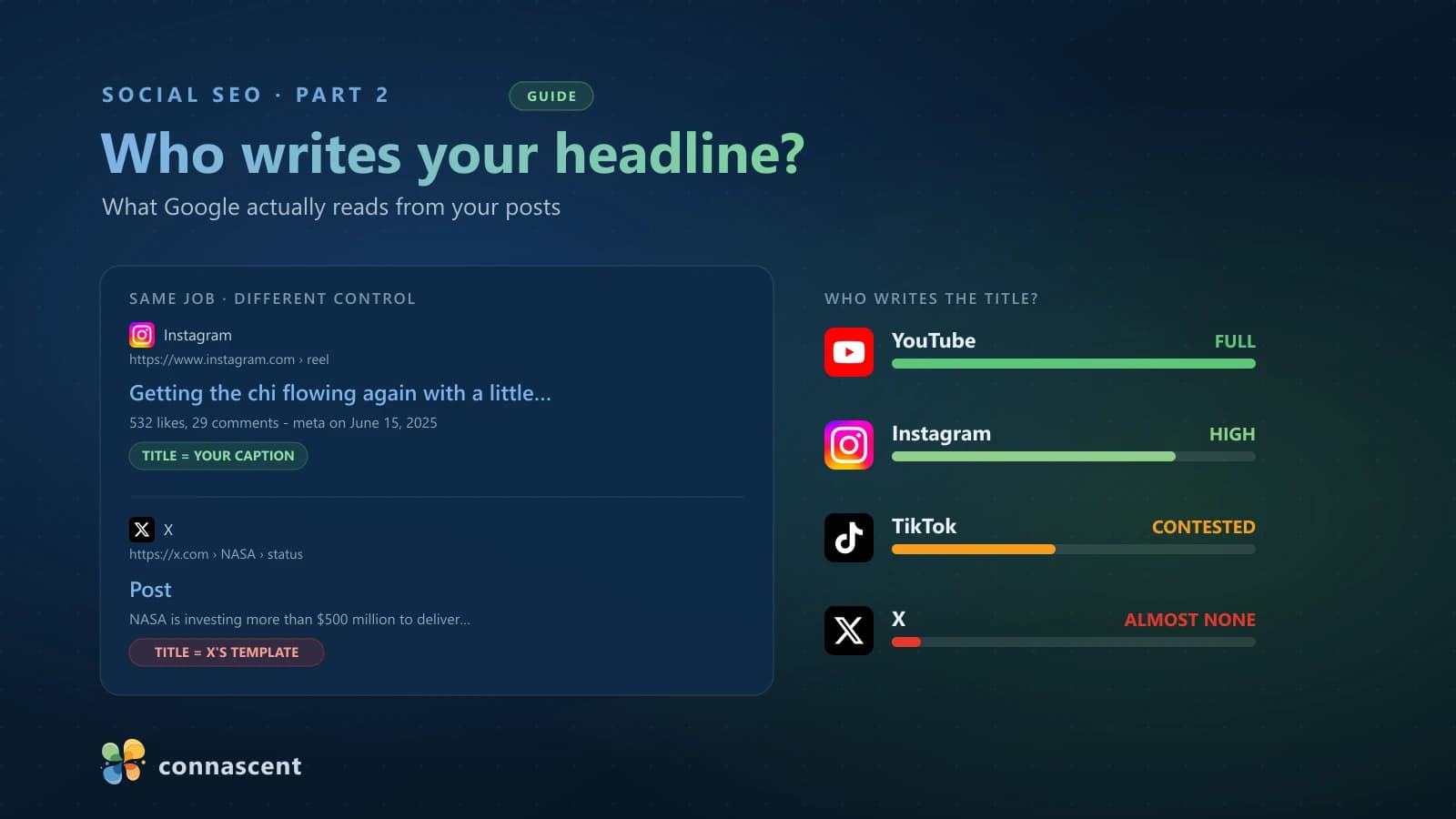
- Google reads a different field on every platform. On YouTube you write the headline. On X you basically don't.
- Instagram's caption is both the title and the quoted part of the snippet. The rest of that snippet is Instagram's template, not yours.
- Comments and likes: Instagram blocks those pages to Googlebot, YouTube doesn't. Same question, opposite answers.
- 'How to' queries hand the top of the page to video, and Google will quote your spoken transcript with a timestamp.
- Verified badges aren't a Google signal, and links out of social pass nothing. Links pointing at your post do work.
What we tested
Start with the toggle that gates everything
Everything below is wasted effort if this one switch is off, so deal with it first. This is Instagram-specific, and it is the single biggest change to social search in years.
What Instagram switched on
On 10 July 2025, Instagram began letting Google and Bing index public content by default. It was not a feature you had to enable. It arrived switched on.
Where the setting lives
In the Instagram app, open Settings and activity, scroll to "Who can see your content," and tap "Account privacy." Look for "Allow public photos and videos to appear in search engine results" (label and path as of July 2026 — Instagram moves these around, and it also links the setting directly at instagram.com/accounts/manage_access). If it is on, Google may index your posts. If someone turned it off, nothing else in this article can help you.
Who qualifies
Three conditions, all of which must be true:
- The account is public and professional (Business or Creator).
- The account holder is 18 or older.
- The post was published on or after 1 January 2020.
If you can't find the toggle
You are almost certainly on a personal account. Switch to a professional account and the setting appears. This is also the opt-out route, incidentally: going private, or switching back to personal, removes your photos and videos from search.
What stays invisible regardless
Stories and Highlights sit outside what the toggle covers. Instagram's indexing programme currently reaches feed posts, Reels, and carousels, so switching it on does nothing for them. Nothing in robots.txt blocks them either; they simply sit behind a login wall with no durable public page to index. Neither are private accounts, or anything posted before 2020. If your strategy leans on Stories, it contributes nothing to Search today, and that is a scope decision by Meta rather than a permanent law.
What Google is allowed to fetch
Before you optimise a single caption, understand the constraint: you are not negotiating with Google, you are living inside the platform's rules. Each platform publishes a robots.txt that decides what Googlebot may even request.
The platforms are allowlists
Instagram names Googlebot explicitly, along with Googlebot-Image, Googlebot-Video, and Googlebot-News. Post pages, Reels, and profiles are not disallowed, so they are fetchable. At the bottom sits User-agent: * followed by Disallow: /, which shuts out every crawler not named on the list. X does the same thing: a dedicated User-agent: Googlebot block, an identical one for Bingbot, and a catch-all that blocks everyone not on the list.
That is worth sitting with. Your social content is visible to search engines that the platform decided to admit. You are a tenant.
Instagram blocks comments. YouTube doesn't.
Here is where a popular myth dies. Instagram's robots.txt disallows Googlebot from /*/comments/ and /*/liked_by/. X blocks the likes and retweets paths on posts. The comment threads are not crawlable pages, so comment text is not indexed content, and salting your comments with keywords achieves precisely nothing in Search.
YouTube is the opposite. In our test, a YouTube snippet surfaced Comments. 2.9K. along with the text of a comment. Same question, opposite answer, depending on the platform.
One caveat on Instagram: the like and comment counts can reach Google, because Instagram prints them into its own meta description. You will see them in some snippets, though Google treats that description as a hint and often rewrites it. The counts are exposed when Google chooses to show them; the conversation never is.
Who writes your headline?
This is the part that surprised us, and it is the reason "optimise your social for search" is bad advice as a single instruction. The field that becomes your headline is different on every platform.
Instagram: your caption is the title
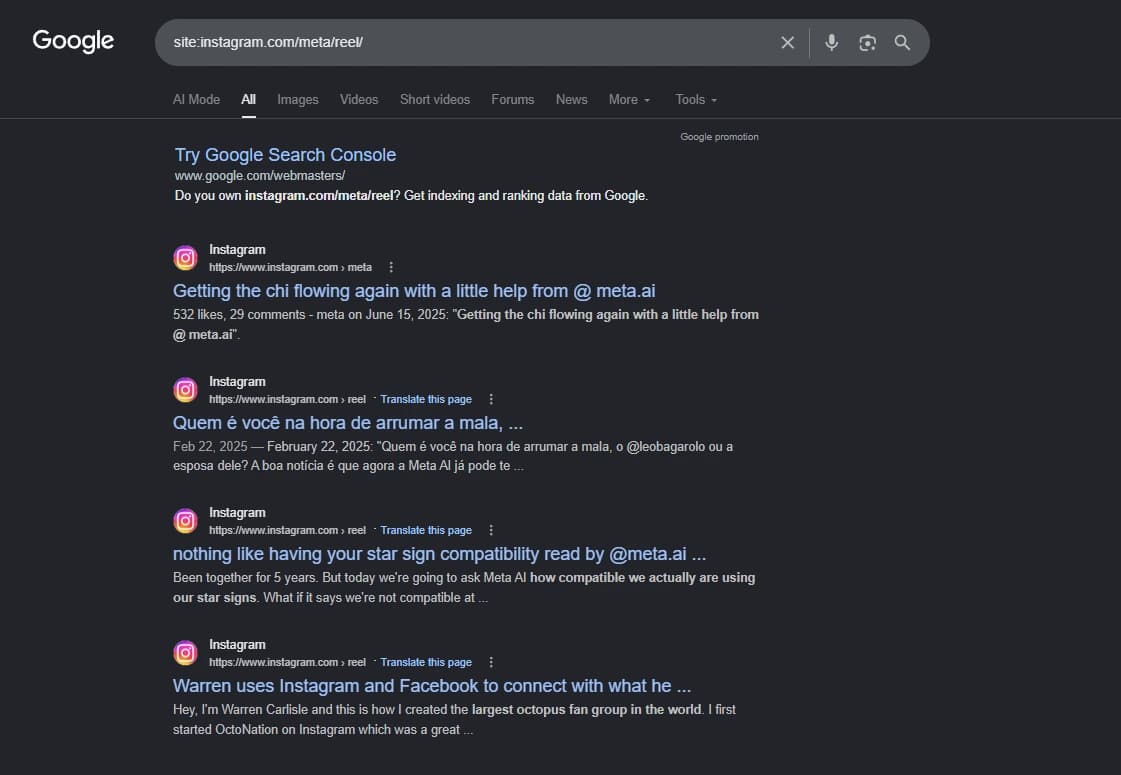
Read that result closely:
Instagram · https://www.instagram.com › reel
Getting the chi flowing again with a little help from @ meta.ai
532 likes, 29 comments - meta on June 15, 2025: "Getting the chi flowing again…"
The blue title is the caption's first line. That snippet is a template Instagram filled in: <likes> likes, <comments> comments - <username> on <date>: "<caption>".
It isn't the only format, and the same screenshot proves it. Look at the three results below that one: Google skipped the counts and wrote its own snippet straight from the caption. Which version you get is Google's call, not yours.
Which makes the point harder, not softer. You are writing inside someone else's <title> tag. You do not control the template, the counts, the handle, or the date, and you do not control which of Google's formats wins. The one field you control is the caption, and it feeds every one of those variants. That is why front-loading your first line is not a style preference. It is the only lever on the page.
X: you get "Post"
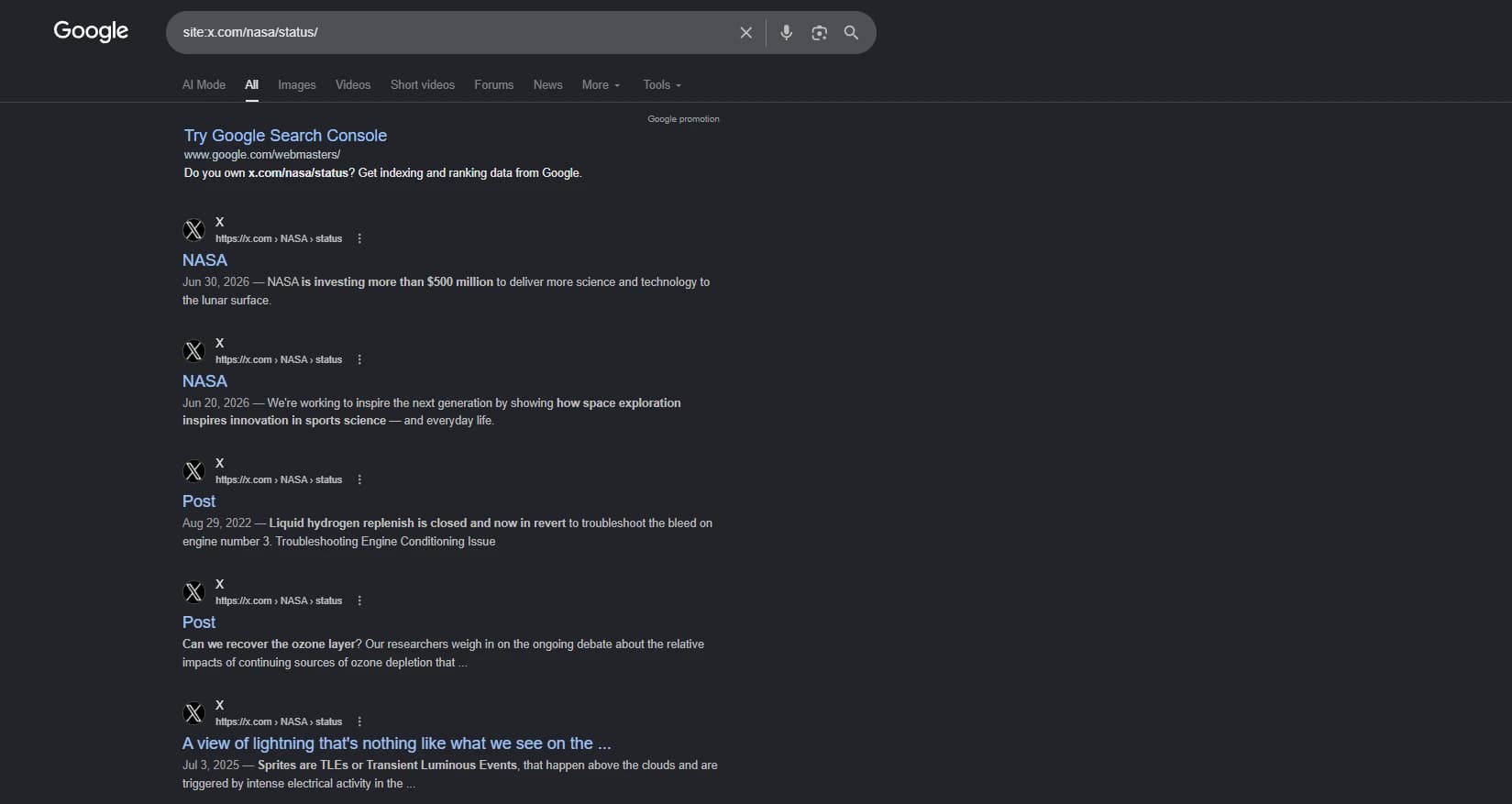
We scoped this to NASA's posts, on the assumption that if anyone could get a decent headline out of X, it would be NASA. Four of the five results were titled "NASA" or literally "Post." Only one used the post's text.
The post text does show up in the snippet. It just does not become the headline. On X, the copy you write almost never becomes the thing people read first in Google. If NASA can't win that fight, neither can you.
TikTok: it depends on your caption
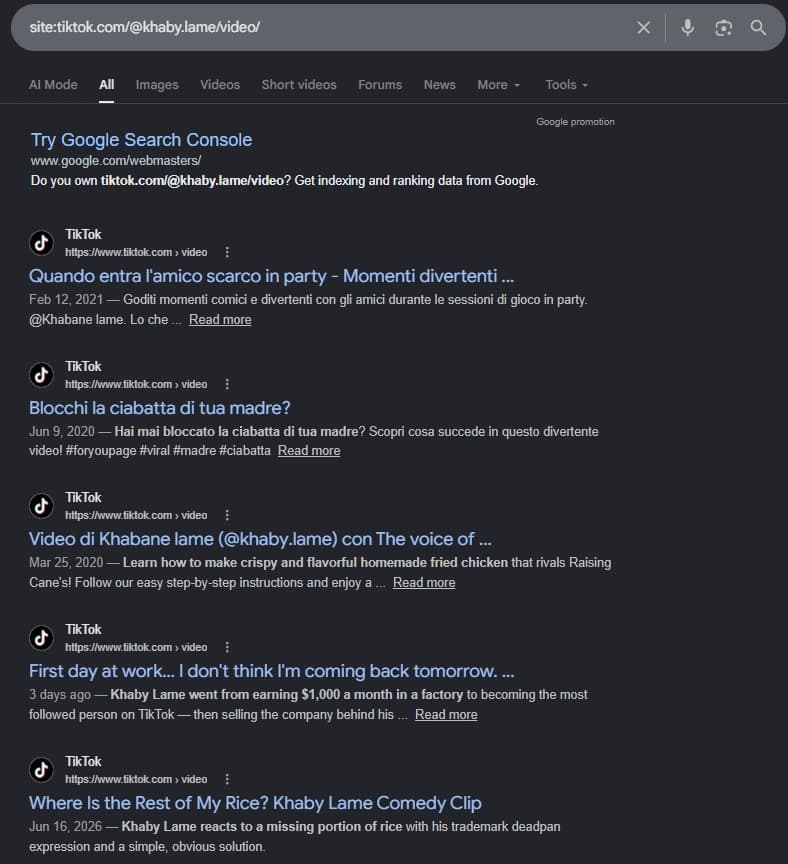
This is the one that corrected us. A bare site:tiktok.com search returns nothing but TikTok's corporate pages, which looked like evidence that creator videos index poorly. It wasn't. Scope the query to one creator's videos and they are all there, going back to 2020 and as recent as three days ago. The corporate results were an artifact of searching a bare domain. Worth remembering the next time someone shows you a site: query as proof of anything.
The interesting part is the titles. On a single page we got all three of Google's documented behaviours:
Blocchi la ciabatta di tua madre?— Google used the caption.Video di Khabane lame (@khaby.lame) con The voice of …— Google used TikTok's template.Where Is the Rest of My Rice? Khaby Lame Comedy Clip— Google rewrote it.
Google's title-link documentation explains this: it builds titles from the <title> element, headings, og:title, prominent text, anchor text, and more, then rewrites when the result is thin or unhelpful. Which is exactly what you would expect to happen to a title that reads "Video by X with sound Y."
The lesson is unusually actionable: write a caption with meaning and you keep the headline. Leave it thin and TikTok's template or Google's rewrite takes it off you.
YouTube: you write it, Google uses it
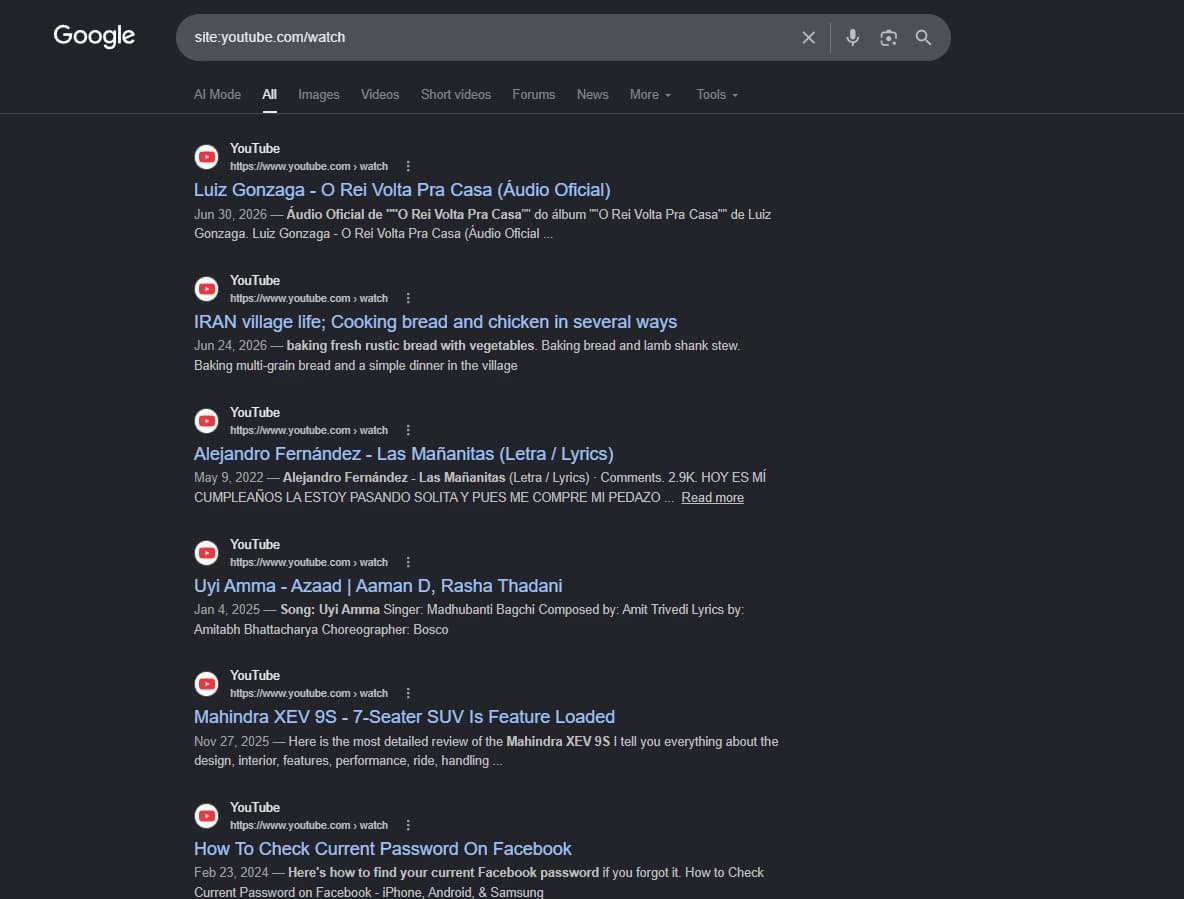
No template, no rewriting, no fight. Your video title comes through word for word and your description becomes the snippet. YouTube gives you more headline control in Google than any other social platform, by a distance.
The hierarchy
Read that as a budgeting decision, not trivia. If you want headlines in Google, effort spent on YouTube titles and Instagram captions pays. The same effort spent polishing X copy buys you a snippet and nothing more.
Why "how to" hands the page to video
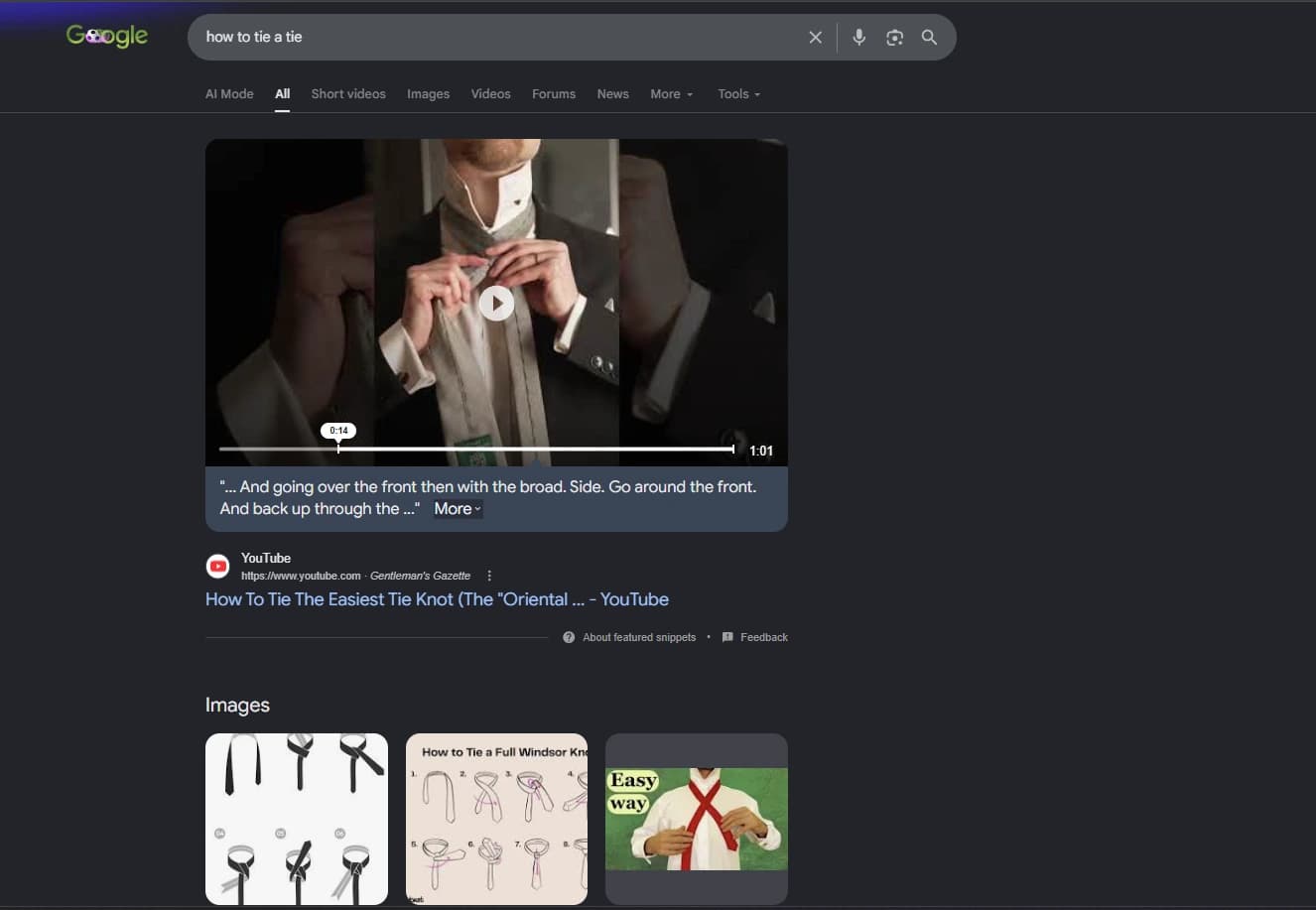
Search how to tie a tie and Google does not lead with a blue link. It leads with a video, playing inline, from a YouTube channel, wrapped in a featured snippet. The thing Google chose to feature as the answer is a video.
That is the mechanic behind video in Search, and it is worth being precise about. It is not that video is favoured. It is that the intent decides the format. Google hands the page to video on queries where a video answers better: how-to, comparisons, "best near me." Ask it something it answers well in text and no amount of optimisation buys you a video slot. Pick the intents that trigger video, or spend the effort elsewhere.
Google quotes what you say out loud
This is the part we would have called speculative if we hadn't watched it happen. Read the text under that player:
"… And going over the front then with the broad. Side. Go around the front. And back up through the …"
Nobody wrote that sentence. Nobody typed it into a description. It is the transcript. Google listened to the video, transcribed it, found the moment that answers the query, and printed the spoken words into the search result. The scrubber sits at 0:14 of a 1:01 video, which is where those words are said.
That is worth sitting with. On video, your script is indexable text, and Google will lift a sentence out of it and put that sentence in front of the searcher. If your video answers the question at fourteen seconds but never says so out loud, you have hidden your best material from the only reader that matters here.
Say the thing, out loud, in words someone would search for.
Google also breaks longer videos into key moments and offers them as separate entry points into a single video. Its video documentation covers both the automatic detection and the Clip and SeekToAction markup you can use to declare them yourself.
What Google needs before a video can rank
Google's video documentation is blunt about the prerequisites. The watch page must be indexed. The indexed watch page must already be performing well in Search. The video must be embedded on that page, must not be hidden behind other elements, and needs a valid thumbnail at a stable URL.
That third requirement is the one people miss, and it quietly answers the "why does their video rank and mine doesn't" question below.
The myths worth killing
Verified badges
There is no evidence that a blue check is a Google ranking signal. Googlebot reads the post page as a web page; the badge is interface furniture. It earns clicks and it matters inside the app. It is not a search lever.
Careful with the research here, too: searching this mostly surfaces Google's own Verified badge for Local Services Ads, which is a different product entirely, a paid ad auction rather than organic Search. And note it cuts the other way there. Google's ad rankings documentation lists "the verification checks you have completed" as part of the profile quality that feeds LSA ad rank. That is a paid placement mechanic. It says nothing about whether a social blue check moves an organic result.
Backlinks from social
Social platforms mark outbound links with nofollow or ugc. Google treats those as hints rather than directives and says such links "will generally not be followed," which settles the strategy question without promising zero. Instagram captions render URLs as plain text for almost everyone; since March 2026 Meta has been testing clickable caption links for Meta Verified subscribers, capped at ten a month and mobile-only. Building backlinks from social is not a strategy; social is distribution.
The "E-E-A-T score"
There isn't one. E-E-A-T is a framework describing what Google's systems try to reward, not a dial in the algorithm. And "social signals" as a ranking factor runs into an awkward fact we already covered: on Instagram and X, Google is robots-blocked from reading your likes and comments. It is hard for a signal to influence rankings when the crawler is not allowed to fetch it.
What actually works
Links into your post
Invert the usual advice. You should not count on pulling PageRank out of social, but once your post page is crawlable it is an ordinary web page, and links pointing at it behave like links pointing at anything else. Link to your own posts from your site, your newsroom, your case studies. Earn a mention in an article. That is discovery and it is signal.
Your anchor text is a title input
Here is the payoff, and almost nobody uses it. Google's title-link docs list "anchor text on the page" and "text within links that point to the page" among the sources it builds a title link from.
You cannot edit Instagram's <title>. But the anchor text you choose when linking to your own post is a documented input into the headline Google builds for it. If you are going to link to your posts anyway, the words you wrap around the link are not throwaway.
sameAs
The one entity lever you fully own is on your own site. Organization structured data with a sameAs array pointing at your official profiles is how you tell Google which accounts are actually yours. Corroboration is what its entity understanding runs on, and unlike a blue check, this part is yours to declare. It is ordinary technical SEO work.
Then measure it
Which brings it back to the scoreboard. Connect your accounts as platform properties and the Performance report shows you the queries pulling people to each post. Query data for social content is the same raw material behind SEO analytics for a website, and it tells you which captions earned their headline.
What to do this week
Your action list
- Check the Instagram toggle and confirm the account is professional. Nothing else matters until it's on.
- Rewrite your next ten Instagram captions so the first line works as a headline, because it is one.
- Stop spending headline effort on X copy. It buys a snippet, not a title.
- Say your key points out loud on video. Google transcribes them and quotes them back with a timestamp.
- Add sameAs to your Organization schema, and use real anchor text when you link to your own posts.
None of this is about posting more. It is about understanding that a social post, once it is crawlable, is a web page with someone else's template wrapped around it, and knowing which field inside that template is still yours.
If you want the social side, your search rankings, and your website working as one system instead of three, get in touch for a free estimate. And if you want the measurement half of this, start with part one.